
I. Transcription then correction: a necessary chain
Today’s speech transcription models are extremely powerful. The level of accuracy they can achieve is often remarkable. Even so, errors remain: imperfect punctuation, awkward sentence segmentation, lexical confusion, or the misrecognition of technical terms.
A large share of these errors can be corrected by a language model, provided that it is given the right instructions.
If you would like a more detailed explanation of how this transcription-correction chain works, and why it matters so much in my particular situation, you can read the article I wrote on that topic.
II. Modular architecture: maintenance and independence
I use several transcription tools and several different interfaces. I have also built a number of Apple Shortcuts that incorporate correction modules.
At first, every change to the prompt — adding a vocabulary item, adjusting a rule, modifying an example — had to be made manually in every piece of software and in every shortcut where it was used. That approach was slow and almost inevitably led to inconsistencies between versions.
So I decided to reorganize the whole system.
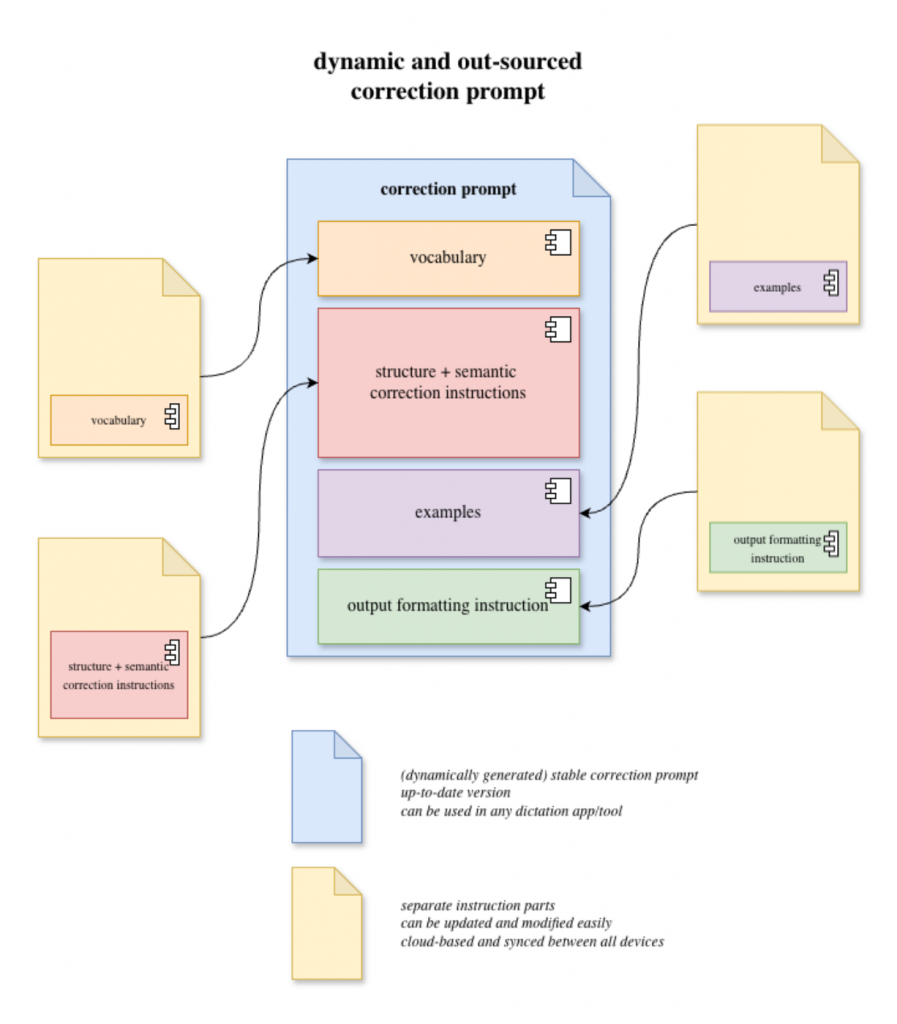
Instead of maintaining a single block of text, I split the prompt into several files:
- a vocabulary file
- a correction instructions file
- a calibration examples file (few-shots)
These files are stored in an iCloud folder. This makes it possible to:
- keep everything synchronized across my devices
- run the shortcuts from my Mac, iPhone, or iPad
- update the system from one central location
This setup makes the whole architecture much easier to maintain and evolve.
Independence from tools
This architecture also has another major advantage: it keeps me independent from the tools I use.
The instructions, vocabulary, and examples remain under my control. Transcription tools simply become environments in which I run those instructions.
Each tool has its own features, strengths, and limitations, of course, but in every case I retain control. If a piece of software disappears, becomes paid-only, or no longer suits my needs, I can switch to another one without rebuilding the entire system. I only need to inject the prompt generated by my compiler.
Today, most voice dictation apps include built-in vocabulary features. I deliberately avoid using them, because they would recreate the very versioning and update problems this architecture is designed to prevent.
The underlying workflow stays the same, even when the tools change.
III. Compilation and variants
To assemble the different files, I created an Apple Shortcut that acts as a compiler. Its logic is simple:
- read the files
- assemble the blocks
- produce a complete prompt
The shortcut does not contain the prompt itself. It simply reads the files and assembles them. This avoids duplication and ensures that every version of the prompt is built from the same source files.
This structure also makes it easy to create variants. I only need to duplicate the shortcut and change the instructions it uses.
I also keep a backups folder containing different versions of the instruction files. This allows me to experiment — especially by adding or modifying instructions — without risking damage to the whole system.
IV. File organization
The files are grouped together in a “speech recognition” folder in my iCloud Drive:
- vocabulary
- instructions
- examples
backupsfolder
The compiler reads these files, assembles the different parts, and copies the final prompt to the clipboard. I can then paste it into any transcription tool or AI interface.
What began as a one-off solution has gradually turned into a small personal infrastructure for correcting dictated text. It allows me to experiment, improve my tools, and avoid starting from scratch every time I need to make a change.
Update : april 26
V. Automating Updates Across Dictation Apps
Since the first version of this architecture, I have added an additional layer of automation. The system no longer only compiles a complete prompt from externalized files: it can now directly update some of the dictation apps I use every day.
The vocabulary remains stored in a JSON file structured by categories. To make it easier to expand, I created a small macOS service available from the right-click menu on a selected word. It lets me quickly add a term to the vocabulary file, choose the relevant category, specify a canonical form if needed, and check whether the term already exists in order to avoid duplicates.
The compiler then assembles the different files: general instructions, vocabulary, and calibrating examples. The final prompt is produced automatically from these sources, without having to manually edit a block of text inside each application.
A second synchronization script then propagates this compiled prompt to several dictation apps, including SuperWhisper, Spokenly, and Sophist. These applications therefore become usage points for a single reference prompt, rather than separate places where independent variants have to be maintained manually.
I have also added a macOS automation that runs this synchronization twice a week. I can still trigger the update manually whenever I have just modified the vocabulary or the instructions, but the system also has a regular update mechanism.
This evolution reinforces the central idea of the architecture: the correction rules are no longer locked inside a specific piece of software. They remain in files that I control, can modify, back up, version, and reuse. The dictation apps are no longer the center of the system; they become execution interfaces connected to a shared base of instructions.
Resources
In a future article, I will describe my transcription-correction shortcut in more detail, along with its integration possibilities. It follows the same overall logic and relies on the same source files as the compiler.